

Simple Signature for Salesforce
Simple Signature creates documents from your Salesforce records and collects e-signatures on them, all inside Salesforce. Send a document, track it, and find the signed copy on the record.
Free 14-day trial Managed package

What Simple Signature does
Documents and signatures in one place, with no extra tool to buy.
Creates and sends documents
Build a document from a Salesforce record and email it for signature. The customer signs on a web page, with no Salesforce login.
Tracks every request
See when a document is viewed, clicked and signed. The status stays on the record, so you always know where it stands.
Signs on mobile
Collect a signature in the Salesforce mobile app, in person or at an event. The signature shows right on the record.
See it work
A customer signs on a phone in under a minute.

Inside Salesforce
Click a picture to open it full size.
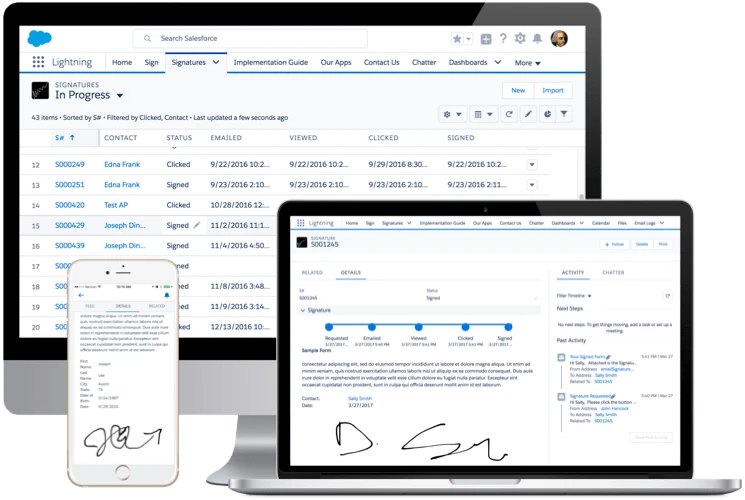
Every request in one list
The Signatures list shows each request with its status, and the time it was emailed, viewed, clicked and signed.
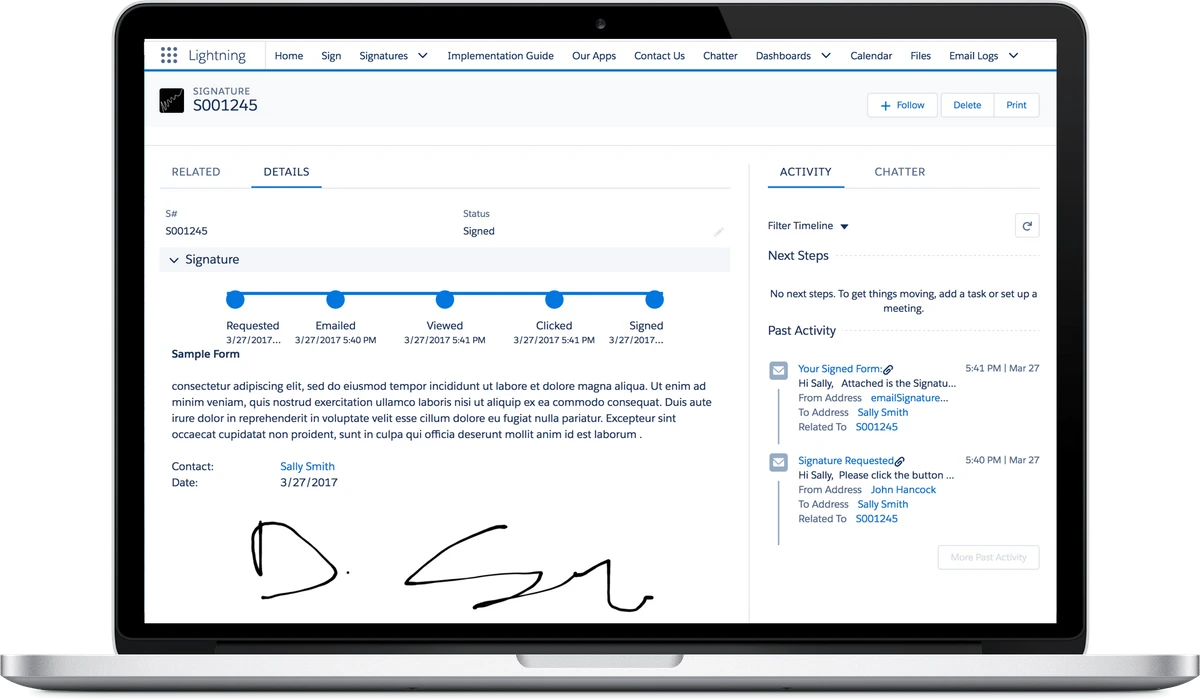
Every step on the record
Each Signature record shows the steps from Requested to Signed, with the time of each step. The signed form and the emails sent sit on the same page.
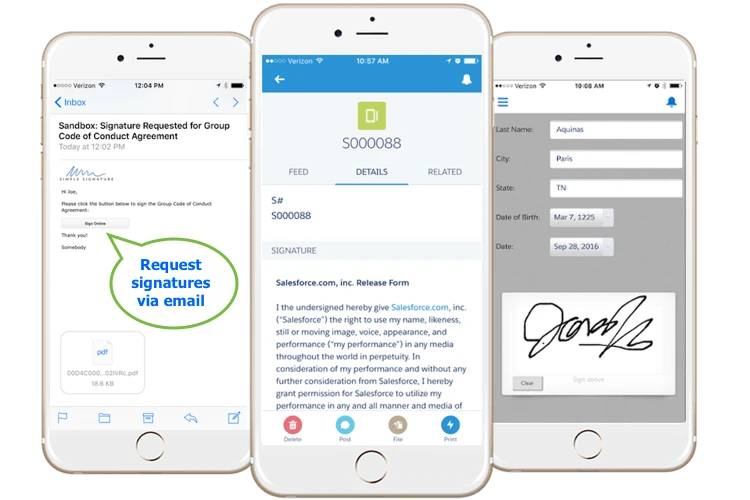
Request by email, sign on a phone
The customer gets the request by email, opens the form and signs with a finger. The same request shows in the Salesforce mobile app.
What customers say
"What a wonderful vendor to work with. Simple Signature is a great product that is easily installed and integrated with Salesforce, but above that, it is a company that cares about working with their users."
"This feature/app is amazing and so easy to understand. Very efficient for having signed documents in the moment and/or at events. So glad we got it, and I highly recommend using it!!"
"Great app! I find this to be easy and very functional a simple way to capture your signature. This is a must for all Salesforce users."
"Simple signature is a straight-up simple execution, with a minimalistic, effective, objective based design. This is the perfect signature solution as it is exactly what it advertises itself to be and works every single time. Cut the clutter and enjoy the effective solution."
Simple Signature FAQs
The questions admins ask most about editions, permissions, email and file storage. Click a question to open the answer.
Simple Signature in Professional Edition can do almost everything in the app except Signature Requests. Professional Edition does not include Salesforce Sites, and Simple Signature uses a Site to host the signature form for people outside Salesforce. The documentation covers this.
The Google Docs integration is not fully proven in Professional Edition, because no Professional Edition clients use that feature yet. So far our Professional Edition clients use Visualforce. Professional Edition does not allow code, so the PDFs need to stay fairly simple.
Link to this answerNot all users need licenses. Only users who need to see signatures or request them from your clients, and users who will administer the app, need one. If a user is in a role that will never need to interact with signatures, you don't have to give them a license.
Link to this answerYes. The app comes with three permission sets:
- Simple Signature (Admin), for anyone who administers the app.
- Simple Signature (User), for all other users.
- Simple Signature (Guest User), for the Salesforce Site guest user only.
To assign one:
- Click the gear icon, then Setup.
- Open Users, then Permission Sets.
- Click one of the three permission sets.
- Click Manage Assignments, then Add Assignment.
- Pick the user who needs the app, then save.
Permission set groups do not work with managed permission sets. You can vote for Salesforce to fix this on the Salesforce IdeaExchange.
Link to this answerThere are a few reasons this can happen. Check them in this order:
- Is the email address correct? If not, the Lead or Contact on the Signature shows a bounced warning.
- Does the user who created the request have one of the app's permission sets? It is usually Simple Signature (User).
- Was the document created? Wait a few minutes, then look at the Files related list on the Signature. If no document is there, the document failed to generate, so the email was not sent.
A document can fail to generate for many reasons. If it failed, open a case so we can look into it.
Link to this answerUnder the Electronic Signatures in Global and National Commerce Act, electronically signed documents are just as legally binding as paper documents. Section 101(a) of the law says this plainly.
That means the wording you use, and your ability to track the process, matter most in making a signature legally binding. We recommend that you test it. In our opinion (we are not lawyers), you can run a legally binding process with Simple Signature.
Link to this answerWe usually don't turn on the license management feature for installs. We do not strictly monitor licensed usage except around renewal time. If your team grows by a few members, or more users want to start using the app, we let you start using it, and we adjust the licenses next year at renewal time.
We don't have a person dedicated to license management, and managing these licenses is a waste of time for our clients as well. All you have to do is assign each user the appropriate permission set.
Link to this answerThe short answer is that we do not offer support. However, if you are interested in upgrading to our paid product and are testing it in the free version, we can offer limited support to make sure your test succeeds.
Link to this answerThe first reason to check is whether the user is assigned one of our permission sets. Assign the "Admin" permission set to anyone who administers the app, and the "User" permission set to everyone else.
Link to this answerThe app uses file storage in three ways:
- It saves a preview PDF. The customer gets it as an email attachment, and the signature page shows it. An admin can set up a Maintenance job that deletes these PDFs after the request is signed. The job can also delete an unsigned request and its PDF after a set number of days.
- It saves a PNG image of the signature. An option deletes this image once the final PDF is made. The image is also saved in a rich text Signature field.
- It can save the final PDF as an attachment in several places. You can skip this. Copy each final confirmation email to a mailbox that keeps it. The final document then lives in email, not in Salesforce.
The app uses standard Salesforce email, and we have no control over what bounces. We have seen this before: when a contact's email bounces, Salesforce marks the contact as bounced. Even after you fix the address, it can keep bouncing. The only fix we have found is to delete the record and start over on a new Contact or Lead.
Link to this answerWe use only named licenses. As an admin, you can change the user assigned to a license.
Link to this answerDid not find your answer? Open a case and a person reads it. See what changed in each version in the Simple Signature change log.
Talk to us about Simple Signature
Book a demo or email our sales team. For a problem with the app, open a case.