

Address Verification for Salesforce
Address Verification checks and corrects the addresses on your Salesforce records, and adds map coordinates to them. It works on any object, handles addresses outside the US, and fills in addresses as users type.
Free 14-day trial Managed package Lightning ready
What Address Verification does
It uses Smarty.com address data to keep the addresses in your org clean.
Checks and corrects addresses
Verify each address against Smarty.com data and fix it on the record. Verified US addresses are CASS-Certified to USPS standards.
Adds map coordinates
Fill latitude and longitude on each record, ready for maps and location searches.
Works on any object
Use it on Accounts, Contacts, Leads and custom objects, for US and international addresses. Auto-complete fills the address in as users type.
See it work
One click verifies both addresses on a record.
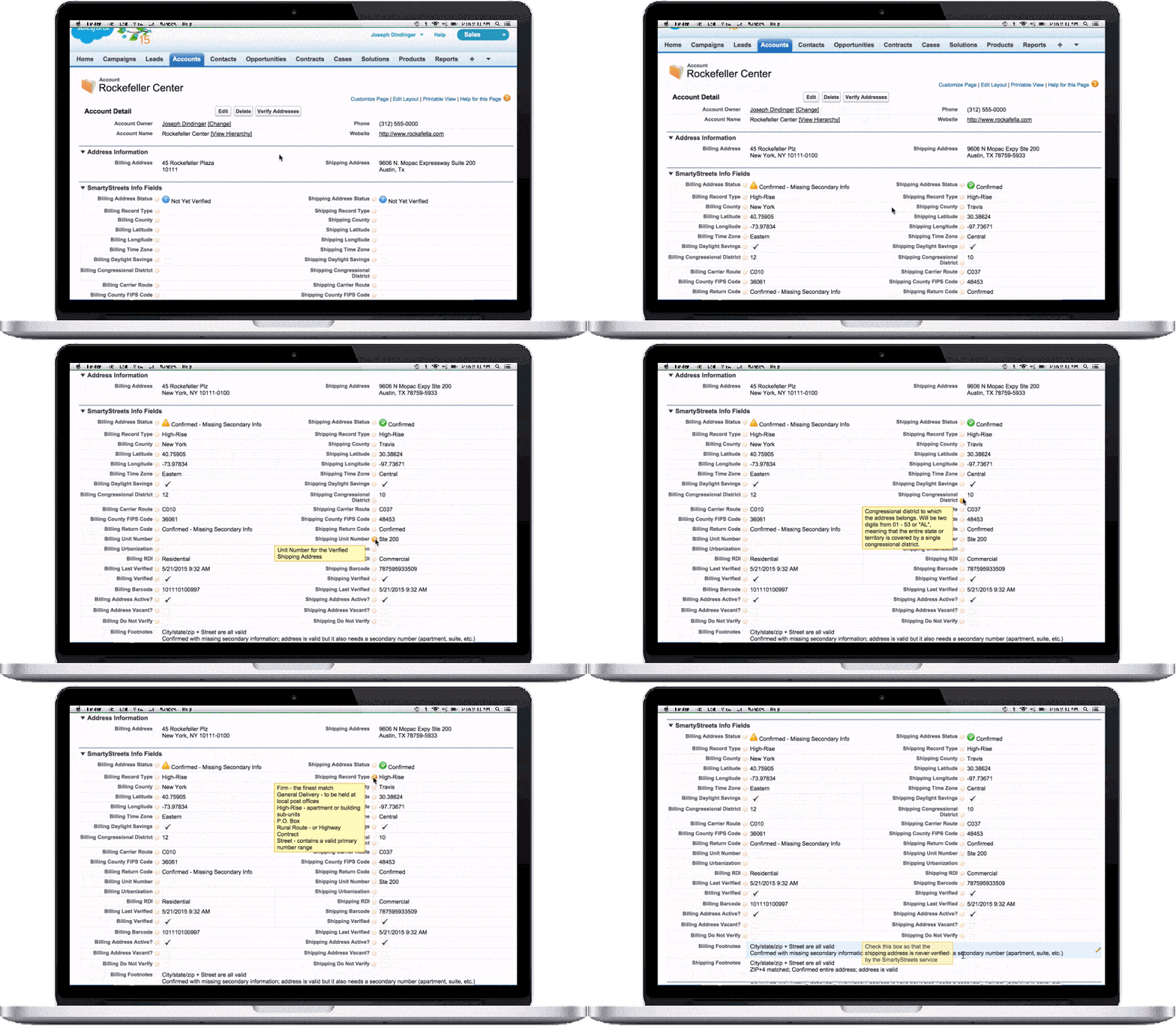
Inside Salesforce
Click a picture to open it full size.
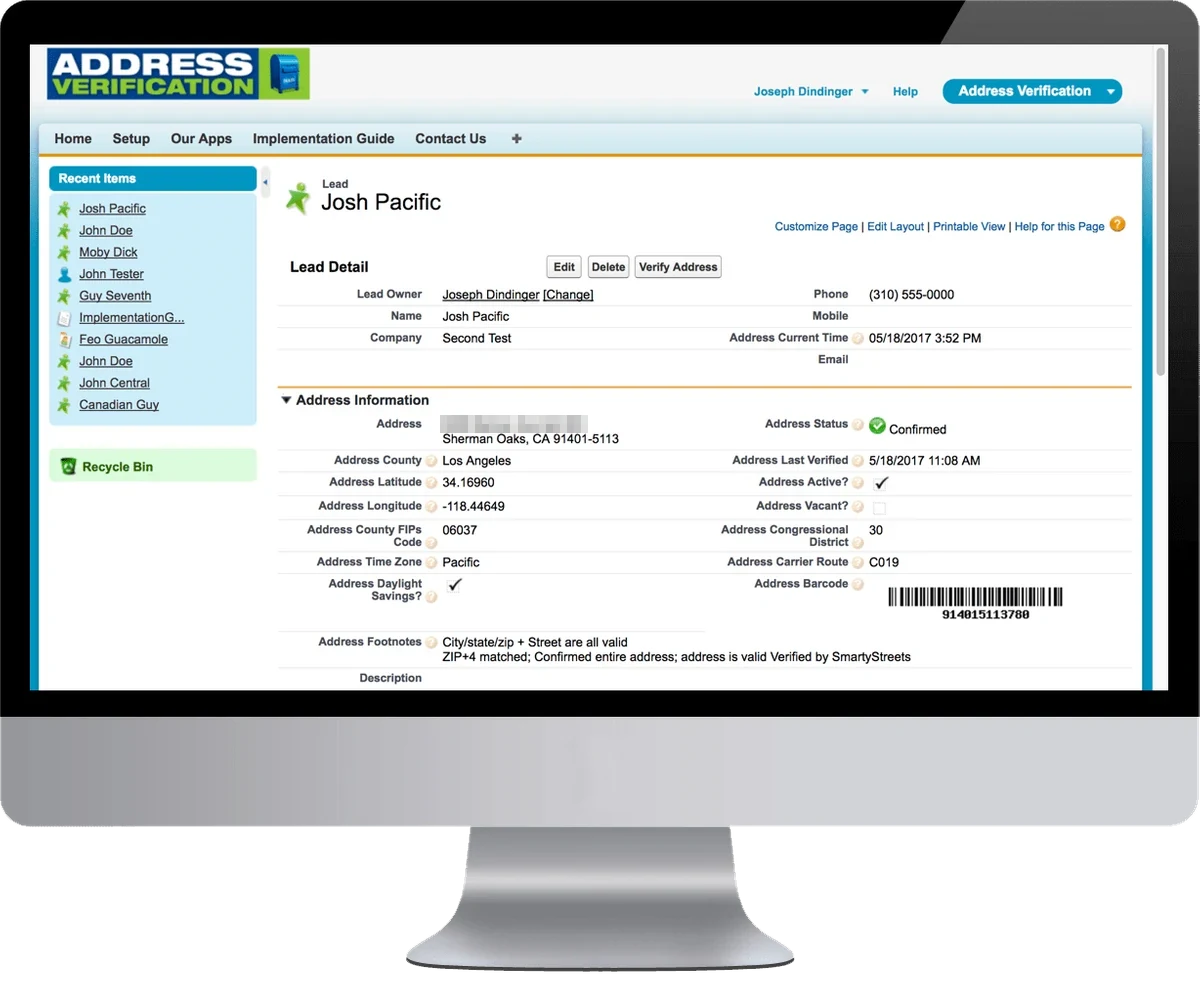
Every detail on the record
On a Lead, the Verify Address button checks the address. The record then shows the status and the time of the last check.
It also shows the county, map coordinates, time zone, local time and a postal barcode.
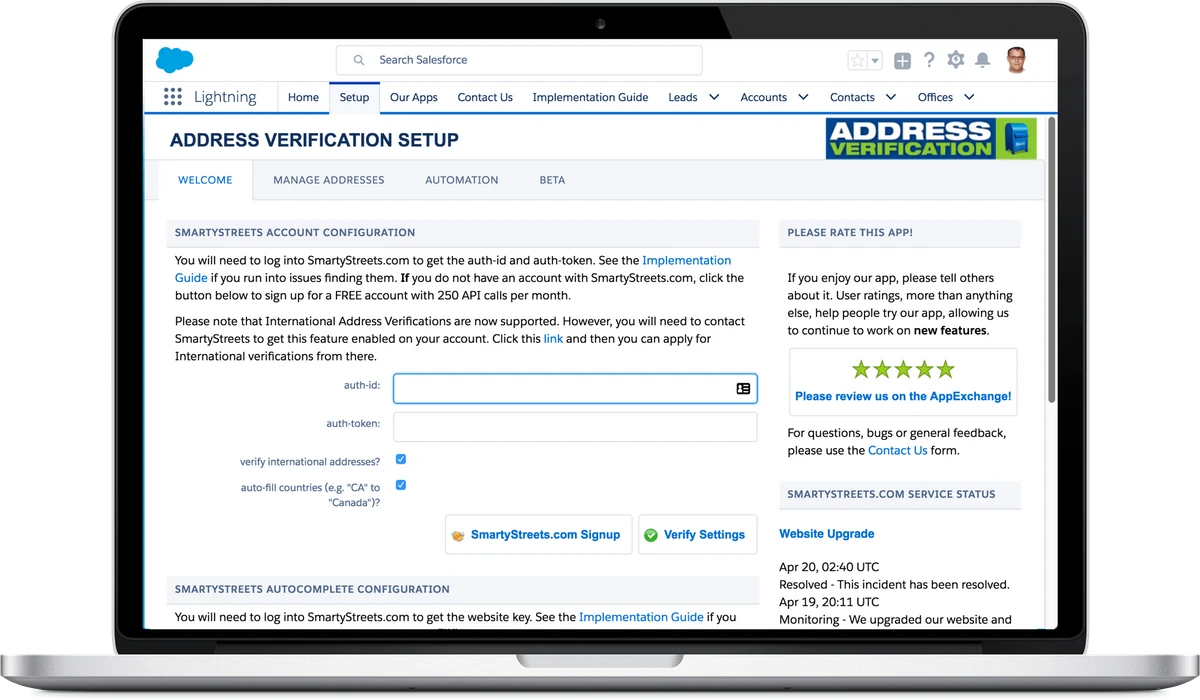
Set up on one page
Paste the two keys from your Smarty.com account into the setup page. Click Verify Settings to test them.
One checkbox turns on international addresses. Another changes country codes to full names, such as CA to Canada.
The pictures show Smarty.com under its old name, SmartyStreets.
What admins say
Custom objects sealed the deal
"We evaluated many apps to satisfy our requirement to verify addresses on custom objects, and Address Verification was deemed the best. Accessibility to the vendor's personnel is good, and its documentation in getting the fields created manually on custom objects and setting up the simple final configuration was helpful. We decided not to use the recommended trigger and customize how the "Verified?" checkbox works, but I'd say the app is lean and slick: an effective front-end to the SmartyStreets back-end."
Service is outstanding
"We're utilizing Address Verification as part of an NGO Connect deployment, both for validating addresses and populating longitude/latitude fields for geo-searches on the website. When we've had questions for the developers about functionality and a user-initiated issue, the response has been lightning-fast, accurate, and solution-oriented. It's really helped us to keep on track for our deployment. The product itself works great and is well-maintained."
Professional customer service
"I love this app because I am a stickler for making sure I get the correct address for my clients and prospects. But I am even more impressed with the personable, professional customer service. Before I got the app, I called the company and was surprised to get a phone call from the owner! Wow, that impressed me from the get-go."
Address Verification FAQs
The questions admins ask most about statuses, batch jobs, lookups, data privacy and fields. Click a question to open the answer.
These addresses are always hard to deal with. The status means an apartment, suite or other secondary number was given on the street line, and it isn't recognized. That can happen for many reasons. The number might be wrong, or a typo. It might also be correct but unregistered.
The only way to know for sure is to ask the person. Even then, if the number is correct, the mail carrier might not deliver to it. The regular carrier might know that "Apt A" is a certain door, but a different carrier on another day might not, because the door isn't marked.
Each business needs to decide how to treat these addresses. Whatever you decide, follow up to make sure the number isn't a typo.
Link to this answerThe import runs in batch mode to create the records. Salesforce refuses to start a batch process from inside a batch process. Our app has to run in batch code, so it cannot be called from a batch process.
We recommend a job that runs once a night, or more than once a day, to verify the imported records.
Link to this answerIf you buy your Smarty.com lookups through us, to get the discount on the app, we check your use once a month. If you get close to your annual number, you choose: upgrade to a bigger package, or wait until the end of your license term and pay an overage at the same rate as your current package. The best choice depends on how far over you will go.
If you buy your lookups directly from Smarty.com, you can set up an automatic renewal. Without one, the lookups stop working when you reach the limit. This does not happen if you buy through us.
Link to this answerThe full error also says: "If you are attempting to use a custom field, be sure to append the '__c' after the custom field name. Please reference your WSDL or the describe call for the appropriate names."
This happens because Salesforce adds new fields with each release. Sometimes these fields are not fully available to all clients, and errors like this one appear. Upgrade to the latest version of our app to fix it.
Link to this answerFirst, make sure the object's page layout has a section called "Address Information". You can change this name in the Object Setup on the Configure page.
If the error stays, do this:
- In Setup, search for Tabs.
- Under Custom Object Tabs, click New.
- For Object, choose √ Layouts, the Address Verification layout object. Pick any tab style.
- Click Next, then Next, then Save.
- Open the App Launcher and search for √ Layouts.
- Delete all the records you find there.
- Open the Auto Complete page again. It rebuilds these records.
- You can now delete the tab you created.
- Open Configure, then Data Mapping.
- Edit the object you want to run the batch job on. If it isn't listed, click "Add Support Object".
- In the object, click the Active Job Id Field.
- Paste the API name of a text field that already exists on the object. The field must hold at least 18 characters.
If this value is blank, no batch jobs can run on the object.
Link to this answerThe Deputy object is a temporary object used during verification. Our batch jobs work in three steps:
- The address on the source record is copied to a new Deputy record.
- The Deputy records are verified. This avoids the slowdowns that flows, triggers, record locks and validation rules cause on the source records during a batch job.
- The verified data is copied back to the source records.
After that, the Deputy records are marked complete, and a scheduled Apex job deletes them. The implementation guide shows how to set up that scheduled job.
Link to this answerUpdate these fields, and Address Verification treats the address as fully verified, the same as through its own process:
- Verified checkbox: TRUE.
- Last Verified date and time: today.
- Return Code: "Confirmed".
- Footnotes: "Manually Set to Verified", or similar.
No. Smarty.com does not support the NCOA database. It used to, but its clients did not find it useful enough. You can read more on Smarty.com:
Link to this answerWe send no personally identifiable information (PII) in the calls to outside data services, such as Smarty.com or the email and phone services. We don't even send a record ID that could trace a call back to a record in your org. That information stays inside your Salesforce org, and we have no access to it. We stay out of PII handling completely.
The app is installed entirely in your own Salesforce org. When you install it, you give it access to your fields and objects, but no outside party or system can reach your data. Everything starts from your side. Your org sends anonymous data to the outside services, and they send the corrected data back. That data holds nothing that lets the service connect it to a person, so it is fully PII compliant with all FTC standards.
Smarty.com, which holds the address data and answers our calls, also takes HIPAA and PII seriously:
If you want no trace of your requests at all, Smarty.com sells an "Enhanced Data Privacy" upgrade, also called "Incognito mode". It is expensive. Smarty.com describes it this way:
"Enhanced Data Privacy" also referred to as "Incognito mode" is an optional Upgrade feature that Enterprise Clients may elect to purchase which prevents Client Data and or Personally Identifiable Information (PII) from ever being logged at the point of submission to Provider's APIs. Client Data submissions are accessed only momentarily in Random Access Memory (RAM), just long enough to process and deliver results back to Client. Upon completion of such process, any residual Client Data in the System's RAM is dumped or "garbage collected" and written over by subsequent transactions. Such processing methods render requests for data deletion, destruction, correction, blocking, or exportation back to Client not feasible due to the nature of the transitory process.Link to this answer
Yes. By default, a US verification does not change the country. To make it consistent, fill in "Fixed Name for USA Verifications" on the Configure page with "US", "USA" or "United States". Every verified US address then uses that name.
Link to this answerWe recommend that you do not show the Verified checkboxes on the page layout. They tell the app whether the address is verified. If a user checks or clears one by hand, the process breaks. Rely on the Status fields for billing and shipping instead.
Link to this answerWe recommend only the Status formula field for each address, plus any optional fields that fit your business process. Review the list of fields in the implementation guide. Decide which ones to map so you collect that data, and which of those to show to users.
Link to this answerUsers enter the Street, and either the City and State or the Zip code. The verification process fills in everything else.
Link to this answerNo. Smarty.com collects updates from USPS and publishes them on the first of each month. Those updates are not pushed into your Salesforce org.
For example, say you verified an address before it was registered. It shows as "Bad or Blank Address" in your org. Only when you verify it again does it come back as a valid address.
Link to this answerVerified US addresses are CASS-Certified to USPS standards. Each other country has its own standards, and the Smarty.com data follows them.
Link to this answerThe maximum length depends on the fields you create in Salesforce. The standard Salesforce address fields have these lengths:
- Address.Street: TextArea, 255 characters.
- Address.City: String, 40 characters.
- Address.State: String, 80 characters.
- Address.PostalCode: String, 20 characters.
- Address.Country: String, 80 characters.
Verification usually removes punctuation. "100 Main St." becomes "100 Main St".
Link to this answerNo. Verification recognizes some abbreviations, but the verified address spells the city name out.
Link to this answerNo. The address might still verify with them there, but the app has an optional field that receives the urbanization code during verification.
Link to this answerThe app comes with four permission sets:
- Address Verification (Admin), for anyone who administers the app.
- Address Verification (User), for all other users.
- Two more for Salesforce Site guest users and for Community users.
To assign one:
- Click the gear icon, then Setup.
- Open Users, then Permission Sets.
- Click the permission set you need.
- Click Manage Assignments, then Add Assignment.
- Pick the user who needs the app, then save.
You can also set up a Flow that assigns the permission set to each new user.
Link to this answerDid not find your answer? Open a case and a person reads it. See what changed in each version in the Address Verification change log.
Talk to us about Address Verification
Book a demo or email our sales team. For a problem with the app, open a case.